


GPS Voice Map & Route Finder
4.2153.00 Reviews
App Specs
- Version
- 1.77
- Updated On
- License
- Free
- Downloads
- 500,000+
- Developer
- Softo Apps
- Categories
- Maps & Navigation
- Platform
- Android
Screenshots


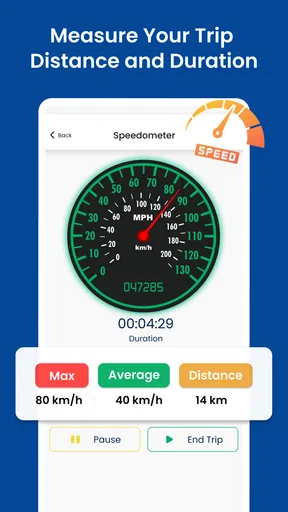
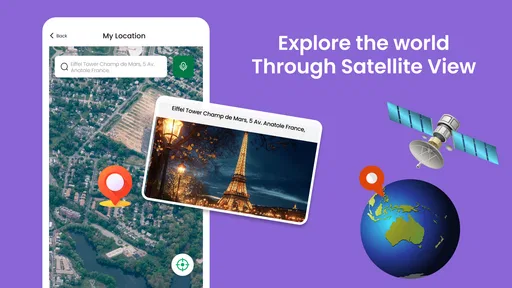
 Analysis by AppCompare
I tend to judge a navigation app less by how impressive its map looks and more by how calmly it helps when I’m somewhere unfamiliar. GPS Voice Map & Route Finder is aimed at that everyday problem: getting a route on screen and receiving spoken guidance rather than constantly checking a phone. That can make a walk across an unfamiliar neighborhood feel more manageable, especially when I want to keep my attention on the street around me.
Reading the route before setting off
The appeal here is the combination of a map, route finding and voice guidance in one place. I find that useful when I need to orient myself first, then follow directions without treating the screen as my only source of information. A quick glance at a route before leaving can help me understand its general shape; once moving, spoken prompts can reduce how often I need to stop and look down.
That said, spoken directions are a supplement, not a substitute for checking the route. In a busy area, at a complicated junction or near a destination with several entrances, I would still pause somewhere safe and confirm where I’m headed. The practical advantage is not that I can ignore my surroundings, but that I may not need to hold the phone up every few seconds.
Voice guidance and different ways of navigating
Voice navigation can suit people who find small map labels tiring to read, have difficulty keeping a phone steady while walking, or simply prefer to listen for the next turn. It can also help when carrying bags or keeping one hand free. I would set a comfortable volume before starting, then keep the phone secured rather than holding it out while crossing streets.
There is a trade-off: audio is only useful when I can hear and understand it. Traffic, wind, crowds or hearing differences can make spoken prompts easy to miss, while headphones can make it harder to notice nearby vehicles and other people. For that reason, I’d treat voice directions as one cue among several and use the visual route when it is safe and convenient. A navigation app cannot make a crossing safe or decide whether a pavement is suitable for a particular person.
Finding places nearby without planning everything
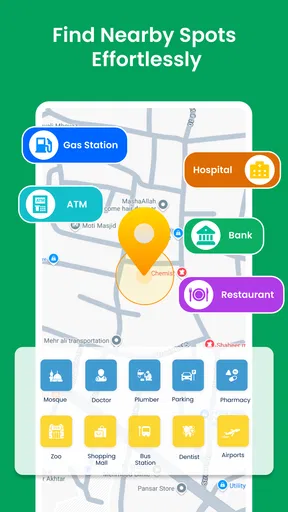
The nearby-place discovery option is handy when I have reached an area but have not decided what to do next. Instead of opening a separate search and beginning from scratch, I can look for local destinations and use the map to get a sense of where they are. That works best as a prompt for exploration, not as a guarantee that every result fits my needs or is open when I arrive.
One useful habit is to choose a destination before I start walking, then check its position and the route while I’m stationary. If I’m meeting someone, I’d also agree on a clear landmark rather than relying on vague directions such as “near the square.” These small choices reduce the chance of needing to fiddle with the screen in a crowded or awkward spot.
Worth Reading Before You Choose

EA SPORTS FC Mobile 26 Is a Bigger Football Game, but It Takes Time

Flipboard Shows What News Apps Must Do Beyond the Feed

Switching to Android Auto Means Rethinking Your Driving Routine

Google Calendar Makes a Crowded Week Easier to Manage

Ludo King Makes the Most of the Minutes Between Plans

Baby Panda World Brings Quick Play to Modern Phones, but Its Game Library Feels Busy
Everyday use, strengths and trade-offs
GPS Voice Map & Route Finder is a free navigation app from Softo Apps. It has a 4.4 average from 723 ratings, and it has passed 500K installs. The app is rated for everyone; its current version is 1.69, and the listed minimum operating-system requirement is 7.0. In-app purchases range from $9.99 to $99.99 per item, so I would check what an optional purchase includes before paying rather than assuming every useful function is part of the free experience.
A realistic trip and a useful workflow
Picture arriving at a neighborhood you don’t know with a café in mind and a second stop afterward. I’d first search for the café while standing somewhere out of the way, review the route, and start voice guidance only once I’m ready to move. After reaching the area, I could use nearby discovery to choose the next stop. This is a simple workflow, but it keeps route decisions separate from walking, which is helpful when streets are busy or I’m carrying something.
For a more reliable outing, I would check the destination spelling and the final approach before setting off. Two places can have similar names, and the route endpoint may not make the correct entrance obvious. If the journey matters—a timed appointment, for example—I’d leave a margin and compare the suggested route with another source rather than assuming the shortest path is automatically the best one.
Where it fits among navigation choices
Compared with the familiar map apps people already use, this app’s clearest appeal is its straightforward mix of voice directions and nearby discovery. Someone who wants a focused way to get a route and browse places around them may appreciate that direct approach. By contrast, if I depend on a particular ecosystem’s saved places, shared live location, transit planning or detailed business information, I would first make sure my usual map service handles those needs better. I wouldn’t switch solely because a new app promises a shorter route.
Route suggestions also deserve a little judgment. A path that looks efficient on a map may involve a difficult crossing, an uncomfortable stretch or a turn that is hard to spot in real life. I’d use the route as guidance and choose a safer, clearer alternative when the surroundings call for it. For driving, I would keep the phone mounted and follow local road rules; for walking, I would stop before making changes rather than navigating while crossing.
Who may find it useful—and who may prefer another option
I can see this being a good fit for casual walkers, visitors exploring a new area, and people who want spoken prompts alongside a map. It is especially convenient for a short trip with a clear destination, or for wandering nearby and deciding on a place to visit. The free entry point makes it easy to try the basic experience, while the in-app purchase range is worth keeping in mind if the app presents an upgrade during use.
I’d be more cautious if I needed accessibility-specific route details, such as confirmed step-free access, surface conditions or dependable information about lifts. I would also choose a different tool if my trip depends on a specialist feature that I already know another navigation service provides. Before relying on any map for a mobility-sensitive journey, I’d verify the route with local information and plan a backup.
My inclusive verdict
What I like about the idea behind this app is that it offers more than one way to follow a journey: I can look at the map, listen for directions and explore nearby places. That flexibility can help different people and situations, but it does not remove every barrier. Small screens, noisy streets, unclear intersections and routes that do not reflect someone’s access needs can still make navigation difficult.
My advice is to test it on a familiar, low-pressure route first. That gives you a chance to see whether the map is comfortable to read, whether the voice prompts are clear in your surroundings and whether the route style suits how you travel. If it works well for that short trip, it may become a handy companion for exploring somewhere new; if you need verified accessibility details or highly specialized planning, keep a more suitable alternative ready.
Ever found yourself wandering in a new city, trying to figure out which way is north and which way leads to your favorite coffee shop? Well, let me tell you about my experience with the GPS Voice Map & Route Finder app. This nifty tool is like having a local guide right in your pocket, and I’m here to spill all the details.
Getting Started: A Breezy Setup
First things first, downloading the app was a breeze. Available on both Android and iOS, it's a quick install, and the user interface is as friendly as a golden retriever. The app doesn’t bombard you with unnecessary clutter, which is a relief. Who wants to navigate through a maze just to get to the settings, right?
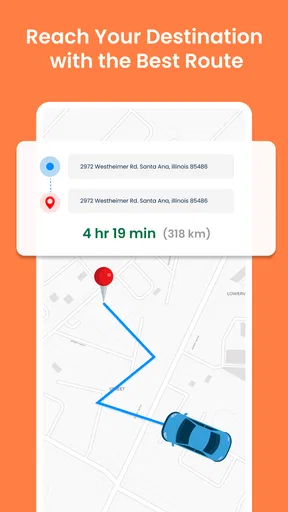
Once you’re in, you’re greeted with a clean, minimalistic design. The main screen offers options like "Find Route," "Explore Nearby," and "Voice Navigation." It’s straightforward and gets you to where you need to go without any fuss.
Features That Stand Out
Now, let’s talk about what makes this app tick. The voice navigation feature is a game-changer. Imagine strolling down the street, phone tucked away, as a soothing voice guides you to your destination. It’s like having your very own co-pilot. The app supports multiple languages, making it super handy for travelers who are exploring a non-English speaking country.
Another feature I love is the "Explore Nearby" option. Whether you’re looking for a cozy café, a historical site, or a hidden gem of a bookstore, this feature provides you with a list of nearby attractions. It’s like having a treasure map that updates in real-time.
User Experience: Smooth Sailing
Using the app is incredibly intuitive. It’s designed to be user-friendly, even for those who might not be tech-savvy. The maps are detailed and load quickly, which is crucial when you’re on the move and need information fast.
What impressed me was the accuracy of the routes. The app seems to have a knack for avoiding traffic snarls, suggesting alternative paths that save you time. It’s like the app has its own secret backdoor routes to everywhere.
Why You’ll Love It
So, why should you give this app a try? Well, if you’re someone who loves exploring new places without the hassle of getting lost, this app is your new best friend. The voice guidance is clear and precise, the maps are up-to-date, and the ability to explore nearby attractions is a delightful bonus.
Moreover, the app is lightweight, which means it won’t hog your phone’s resources or battery life. It’s efficient, and let’s be honest, we could all use a little more efficiency in our lives.
Wrapping It Up
In a world where getting lost is just a wrong turn away, the GPS Voice Map & Route Finder app is a must-have tool for anyone who loves to explore without limits. It’s precise, user-friendly, and packed with features that make navigation a breeze. Whether you’re a frequent traveler or someone who loves weekend adventures, this app is worth every megabyte of space on your phone.
So, go ahead, give it a whirl. Download the app, and let your adventures begin with a reliable guide right in your pocket. Happy exploring!
Pros
- User-friendly interface makes navigation easy.
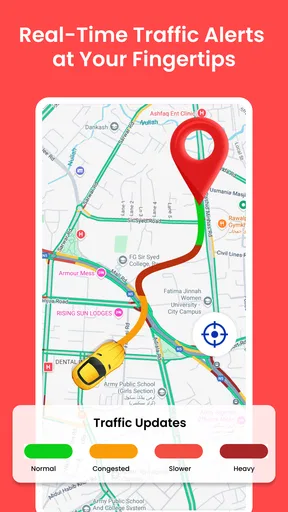
- Real-time traffic updates enhance route accuracy.
- Offline maps available for remote areas.
- Customizable voice guidance options.
- Integrates well with wearable devices.
Cons
- Occasional inaccuracies in less-known areas.
- Consumes battery faster than some competitors.
- Limited language options for voice guidance.
- Requires data for live traffic updates.
- Ads can be intrusive in the free version.
FAQs for GPS Voice Map & Route Finder
What features does the GPS Voice Map & Route Finder app offer?
The GPS Voice Map & Route Finder app provides real-time navigation with voice guidance, offline maps, and route optimization features. It also includes live traffic updates, points of interest, and customizable routes to enhance your travel experience. Additionally, it supports pedestrian, cycling, and driving modes to cater to various travel needs.
Is the GPS Voice Map & Route Finder app available offline?
Yes, the GPS Voice Map & Route Finder app offers offline functionality. You can download maps for specific regions and use them without an internet connection. This feature is particularly useful for areas with poor connectivity or when traveling abroad to avoid roaming charges. Ensure to download the maps beforehand.
How accurate is the GPS Voice Map & Route Finder app?
The app utilizes advanced GPS technology to provide highly accurate navigation and positioning. However, accuracy can vary based on satellite visibility, environmental conditions, and device hardware. Regular updates and map corrections help maintain reliability, but it's always good to cross-check with physical landmarks when necessary.
Does the GPS Voice Map & Route Finder app include live traffic updates?
Yes, the app includes live traffic updates to help you avoid congestion and find the fastest route. It uses real-time data to provide alerts about accidents, road closures, and traffic jams. This feature requires an active internet connection to fetch live data and ensure optimal route planning.
Can I customize my routes with the GPS Voice Map & Route Finder app?
Absolutely, the app allows users to customize routes based on preferences such as avoiding toll roads, highways, or specific areas. You can also add multiple stops or waypoints to your journey. This flexibility ensures that you can tailor your travel according to your specific requirements and preferences.


